How it works

From download to a live URL in about a minute.

01
Download & sign in with Apple
Drag UrlyUp to Applications and open it. Signing in with Apple reserves your public URL and turns on Mac Hosting.
02
Add a Runner
Point it at a folder, a Git repo, or a docker-compose file. It can be a static site, Node, Python, PHP or a full container. UrlyUp builds it and runs it in its own isolated space.
03
Share the URL
Turn on the public URL and anyone can reach your Runner. It stays isolated the whole time.

Manage everything you host from the Mac Hosting app.

Run Docker Compose stacks, edit configs, read live logs and fix broken deploys in a native macOS window, or have your AI agent do it over MCP.
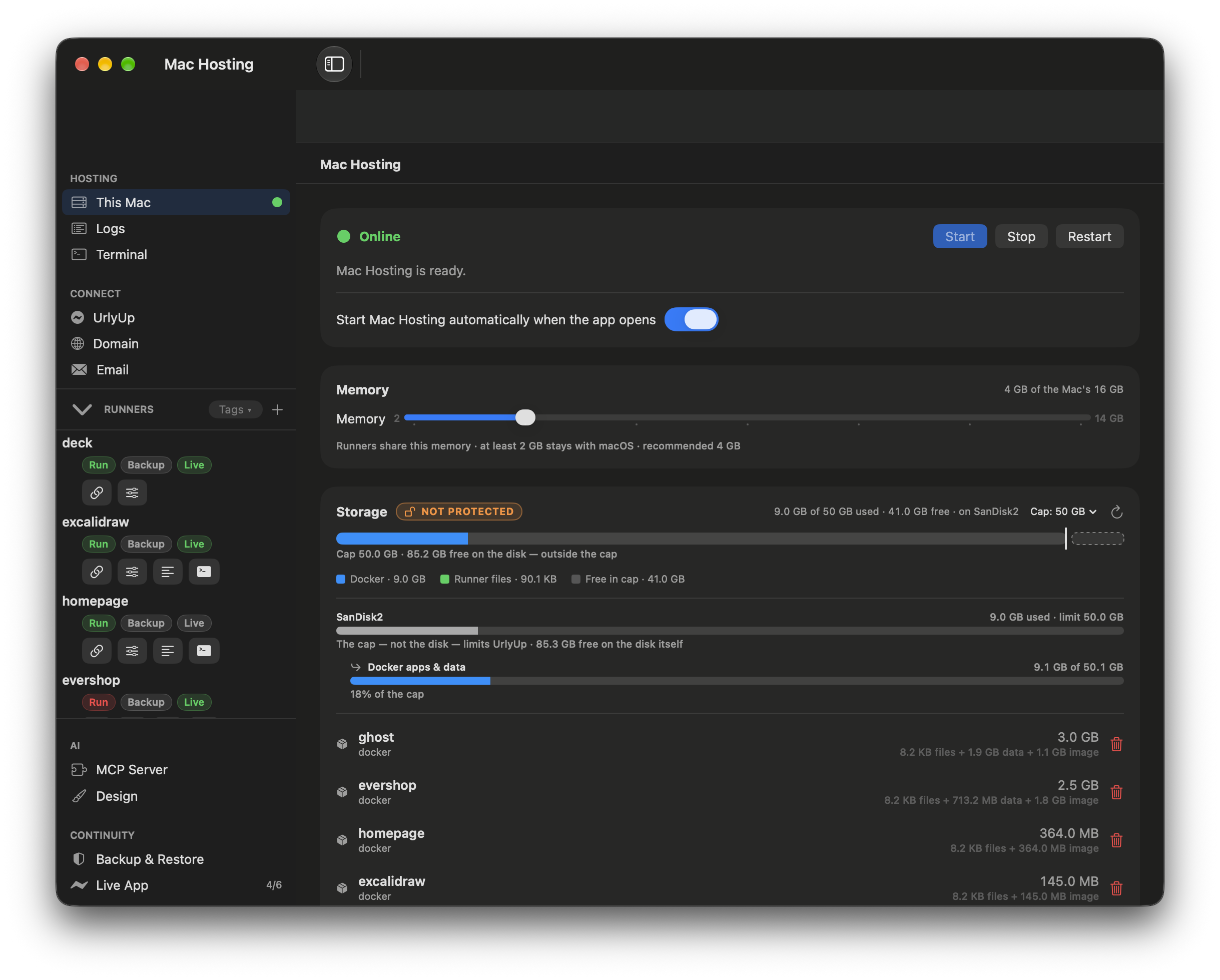
UrlyUp Mac Hosting app: control everything hosted
Docker Compose, managed
Run, stop, update and recreate full container stacks. UrlyUp injects the ${URLYUP_API_PORT} scheme so your services publish on the public URL ${URLYUP_API_PORT}-project-on.urlyup.com.
Fix with AI
If a compose file doesn't validate, one click rewrites it to match UrlyUp's port and networking rules.
machosting-on.urlyup.com
RÓST.
BeansSubscriptionsCafé
Order
SINGLE-ORIGIN · OAKLAND
Mornings,
made better.

Small-batch beans, roasted the day we ship them. Fresh to your door every two weeks.

Shop beans →
ETHIOPIA·COLOMBIA·GUATEMALA·KENYA
Live on the internet
Public on the internet, running on your Mac.

The public URL connects over an encrypted link straight into the Runner's isolated space. Visitors get a normal HTTPS address, and your Mac's own network isn't exposed.

✓Live logs, streamed & searchable, with an AI diagnose button
✓Git webhooks & deployment history with one-click rollback
✓Light and dark mode with native macOS controls

git push,
and it's live.

Connect a repo and each push updates your Runner. UrlyUp pulls, builds and reloads it, and only switches over once it gets a 200 response.

✓Push-to-deploy webhooks from any Git host
✓Deployment history with one-click rollback
✓Never ships .git, .env or node_modules
$ git commit -m "ship it"
$ git push origin main

→ webhook received
→ build + reload runner
✓ 200 verified · live at your-app-on.urlyup.com

Email, already
set up.

Most apps need to send email for signups, password resets and notifications. Setting up SMTP, a mail provider, DNS records and API keys takes time, so UrlyUp does it for you.

A real mailbox per Runner
Each Runner gets its own address on your UrlyUp domain. You don't sign up for anything, edit DNS or tune deliverability.
Send with SMTP or one API call
Credentials are added to your Runner automatically. Use them from any framework, or POST to the send API. There are no keys to copy around.
An inbox for replies
Confirmation links and incoming mail go to an inbox you can read, which helps when you're testing.
Runner · EmailReady
Fromhello@your-app.urlyup.email
SMTPsmtp.urlyup.email:587auto
API keyuk_live_••••••••••••injected
# send from anywhere in your Runner
curl $URLYUP_EMAIL_API/send \
  -H "Authorization: Bearer $URLYUP_EMAIL_KEY" \
  -d '{"to":"user@x.com","subject":"Verify"}'

Common questions

How long does it take to get a live URL?+

About a minute. Download and sign in with Apple, add a Runner from a folder, a Git repo or a docker-compose file, then turn on the public URL.

What happens when I close the app or restart?+

Quitting closes the window, and you choose whether hosting keeps running. UrlyUp can start Mac Hosting automatically when it launches, so your Runners come back by themselves. It also saves your data on shutdown so nothing is lost.

Can a git push ship my secrets?+

No. Push-to-deploy never ships .git, .env or node_modules, and UrlyUp only switches over once the new build answers with a 200.

Do I need to set up email for my app?+

No. Each Runner gets its own address on your UrlyUp domain, and SMTP credentials are added to the Runner automatically. You don't sign up for anything or edit DNS.

All questions and requirements →
UrlyUp

Download it and put your first app online.

Use the Mac you already have as your server.

Self-hosting free · macOS 14+ · Apple silicon (M Series)

What you need

💻
Apple Silicon
Any Apple Silicon (M Series) Mac.
🍎
macOS Sonoma (14)+
Or later. Built on Apple's Virtualization framework.
🧠
8 GB memory
8 GB works. 16 GB is better if you run several apps.
💾
10 GB free
Disk space you need to get started.
🌐
Internet connection
Needed to serve your apps publicly.
🔑
Sign in with Apple
Used to reserve your public URL.